This section explains the Number Detection functionality and its settings.
Number Detection functionality
Number Detection reads a number displayed on the screen and checks whether it satisfies a specified condition (equal, greater or equal, less or equal, within range, and so on). You can specify what happens when detection succeeds and when it fails.
By default, the action is set to tap the center of the detected number when detection succeeds.
Number Detection Settings
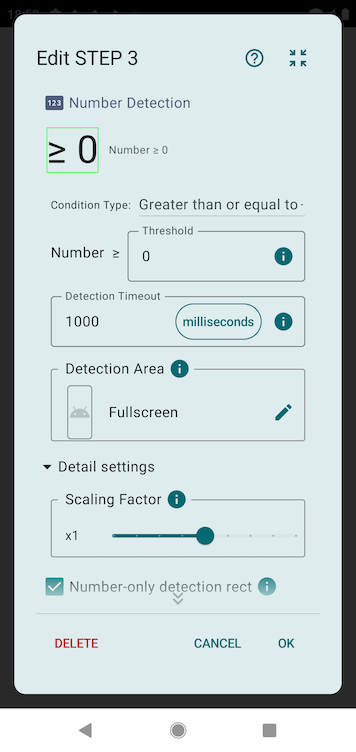
Detection condition
Specifies how the detected number is evaluated. You can choose one of the following condition types:
- Equal to: Matches when the detected number equals this value.
- Not equal to: Matches when the detected number does not equal this value.
- Greater than or equal to: Matches when the detected number is greater than or equal to this value.
- Less than or equal to: Matches when the detected number is less than or equal to this value.
- Within range: Matches when the detected number falls within the specified minimum and maximum (both inclusive).
- Divisible by: Matches when the detected number is divisible by the specified value (remainder 0). For example, 5 matches 5, 10, 15…
Detection timeout
Specifies how long to wait after detection starts before it is treated as a failure. Tap the unit to switch to a different unit.
Detection area
Detection is performed only within a screen area you specify in advance. Specifying an appropriate detection area improves detection rate and efficiency, so please specify it whenever possible.
Scaling factor
Scales the screen by the specified factor before detection. If the detection area is very small, the number may not be detected correctly; in that case, scale up before detecting.
Number-only detection rect
When ON, the detection rectangle covers only the number. When OFF, it covers the whole element containing the number (including symbols and units). Turning it OFF can be more stable when the rectangle is misaligned with the number.
Actions after detection
You can specify the actions to perform when detection succeeds and when it fails. Only when detection succeeds can you use actions that operate on the detected target, such as tapping it.

If Number Detection Does Not Work Properly
Number Detection uses text recognition (OCR), so the same tips as Text Detection apply. If detection does not work well, try narrowing the detection area or increasing the scaling factor.
Please refer to the FAQ section related to text detection for troubleshooting.